Blog article
Visual Identity Guide Maker: Complete Brand Systems Made Simple
A visual identity guide transforms isolated design elements into a cohesive brand system. Discover how AI-powered tools make creating comprehensive visual identity documentation fast, professional, and accessible.
What is a Visual Identity Guide?
A visual identity guide is a comprehensive document that defines all visual elements of a brand and how they work together as a system. Unlike a simple logo sheet, a visual identity guide provides complete specifications for maintaining brand consistency across every application.
Core Components
Professional visual identity guides include:
- Logo System: Primary mark, variations, construction, spacing
- Color Palette: Primary, secondary, and accent colors with all specifications
- Typography: Font families, hierarchy, pairing rules, sizing
- Graphic Elements: Patterns, shapes, icons, illustrations
- Photography Style: Mood, composition, treatment guidelines
- Application Examples: How the system works in real contexts
Why Visual Identity Guides Matter
They Create Systems, Not Just Assets
A logo alone isn't a brand. A visual identity guide shows how all elements work together to create a distinctive, memorable brand experience.
They Enable Consistency
Consistent brands are recognized 3.5 times more often than brands with inconsistent presentation (Lucidpress). Visual identity guides are the foundation of this consistency.
They Save Time and Money
Clear guidelines reduce:
- Questions from team members and vendors
- Revision cycles due to incorrect usage
- Time spent searching for correct assets
- Mistakes that require costly corrections
They Scale With Growth
As organizations grow, more people need access to brand assets. Visual identity guides ensure quality remains high even as the team expands.
The Traditional Challenge
Complex Software Requirements
Creating visual identity guides traditionally requires:
- Adobe InDesign mastery: Master pages, character styles, paragraph styles
- Design expertise: Layout, typography, visual hierarchy
- Technical knowledge: Color management, PDF export, font embedding
Significant Time Investment
A comprehensive visual identity guide typically requires:
- Planning: 1-2 hours to structure and organize
- Design: 5-8 hours to create layouts and templates
- Content: 2-4 hours to add all specifications
- Refinement: 2-3 hours for polish and quality control
The Unfortunate Result
Due to time constraints, many visual identity guides are:
- Only created for premium projects
- Delivered incomplete or rushed
- Never updated after initial creation
- Skipped entirely for smaller clients
AI-Powered Visual Identity Guide Makers
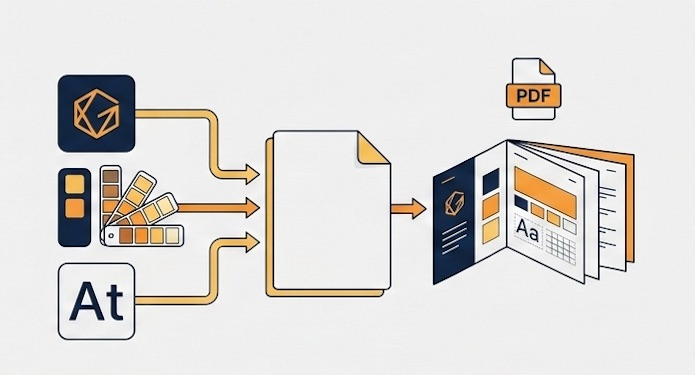
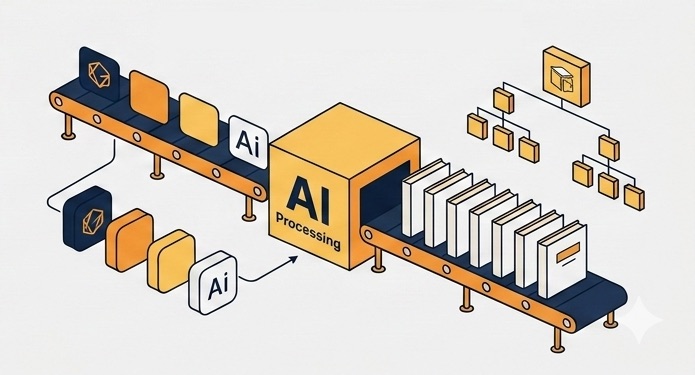
Modern visual identity guide makers use artificial intelligence to automate the entire creation process. You provide the brand elements; the AI creates professional, comprehensive documentation.
The Automated Process
Step 1: Gather Your Assets (5 minutes)
Collect your visual identity elements:
- Logo files (primary, alternate, icon versions)
- Color codes (hex, RGB, CMYK)
- Font files (primary and secondary)
- Application mockups or examples
Step 2: Upload to the Generator (3 minutes)
Input your elements through a simple interface:
- Upload logo variations
- Enter color values and names
- Add typography files
- Include mockup images
Step 3: AI Generation (10 seconds)
The system automatically:
- Analyzes your visual identity system
- Creates professional page layouts
- Generates proper spacing and hierarchy
- Formats all technical specifications
- Produces a polished, print-ready PDF
Step 4: Download and Share (1 minute)
Receive a complete visual identity guide ready to distribute to teams, clients, or vendors.
Total time: ~9 minutes vs. 10 hours
Essential Features of Quality Visual Identity Guide Makers
1. Comprehensive Documentation
The best tools create complete guides, not just logo pages:
Essential Coverage (8 pages)
- Professional cover and contents
- Logo presentation and basics
- Logo color variations (2-3)
- Color palette specifications
- Typography system
- Professional back cover
Comprehensive Coverage (12+ pages)
- Everything above, plus:
- Logo exclusion zones
- Incorrect usage examples
- Extended color palette
- Application mockups
- Additional usage guidelines
2. Professional Design Quality
AI-generated should mean consistently excellent, not generic:
- Clean, modern layouts
- Proper typographic hierarchy
- Consistent spacing and alignment
- Professional color representation
- Print-ready output quality
3. Complete Privacy
Visual identity assets are confidential. Choose makers that:
- Process files locally on your device
- Never upload assets to external servers
- Don't collect or store brand data
- Ensure complete confidentiality
4. Multi-Language Support
For international brands or multilingual markets, generate guides in multiple languages:
- English for global distribution
- French for European markets
- German for European markets
5. Unlimited Creation
Avoid restrictive per-project fees. Premium tools offer unlimited guide generation.
BrandBookPro AI: Purpose-Built for Visual Identity
BrandBookPro AI specializes in creating professional visual identity guides for designers, agencies, and brand professionals.
Two Professional Tiers
Freelancer Plan
8-page visual identity guides with:
- Professional cover and table of contents
- Main logo presentation
- 2 logo color variations on different backgrounds
- Color palette with 3 colors (hex, RGB, CMYK codes)
- Primary typography with character specimens
- Secondary typography with character specimens
- Professional back cover with copyright
Agency Plan
12-page comprehensive guides including:
- Everything in Freelancer plan
- 3 logo color variations
- Logo exclusion zone with measurements
- 6 incorrect logo usage examples
- Extended color palette (5 colors)
- 2 full-page application mockups
- Premium support via email
Distinctive Features
100% Local Processing
All AI runs in your browser. Your files never leave your device. Perfect for:
- Working under NDA
- Unreleased brand identities
- Confidential client work
- Privacy-sensitive projects
Unlimited Projects
Create as many visual identity guides as needed with no additional costs.
Free Trial
Test the complete platform with Experience quality and efficiency before committing.
Best Practices for Visual Identity Guides
Show, Don't Just Tell
Include visual examples of correct usage, not just written rules. Show logos in context, colors in application, typography in real layouts.
Include Negative Examples
Show what NOT to do. Visual "never do this" examples prevent common mistakes more effectively than written warnings.
Provide Context
Explain the thinking behind design decisions. Help users understand not just the "what" but the "why."
Make It Accessible
Distribute widely to everyone who needs it. The more people who have access, the more consistent brand application will be.
Keep It Updated
Brands evolve. With a visual identity guide maker, updates take minutes, not days. Keep documentation current.
The Business Impact
Time Savings
Traditional creation: 12 hours × $100/hour = $1,200
With BrandBookPro AI: 10 minutes × $100/hour = $16.67
Savings per project: $1,183.33
Monthly Impact (8 guides)
- Time saved: 95+ hours
- Value reclaimed: $9,466
- BrandBookPro cost: $19-39/month
- Net benefit: $9,427-9,447
Expanded Service Offering
Include visual identity guides in every branding package:
- Differentiate from competitors
- Justify premium pricing
- Reduce post-delivery questions
- Create opportunities for updates
Common Questions
Is AI-generated quality good enough for professional use?
Absolutely. Modern AI excels at layout, typography, and visual hierarchy. BrandBookPro AI produces results that match or exceed manual InDesign work.
What about customization?
You control all the content: logos, colors, fonts, mockups. The AI handles professional presentation. This isn't limiting—it's liberating.
Will this replace my design skills?
No. It amplifies them. You focus on strategy, creativity, and client relationships. The AI handles mechanical documentation tasks.
What if I need to make changes?
Simply regenerate with updated assets. Takes the same 10 minutes. No need to find and update individual InDesign files.
Getting Started with BrandBookPro AI
- Start your free trial at BrandBookPro.ai
- Prepare assets from a current or recent project
- Generate your first guide in minutes
- Compare to traditional methods in time and quality
- Choose your plan and integrate into workflow
Conclusion: Professional Documentation Made Simple
Visual identity guides are essential for maintaining brand consistency, enabling teams, and delivering professional value. But creating them shouldn't require advanced software skills or consume days of your time.
AI-powered visual identity guide makers like BrandBookPro AI make professional documentation accessible to every designer and every project, allowing you to:
- Deliver comprehensive guides to every client
- Reclaim hundreds of hours annually
- Focus on strategy and creativity
- Provide exceptional value efficiently
The future of visual identity documentation is here. It's fast, professional, and accessible.
Transform Your Visual Identity Workflow
Create professional visual identity guides in minutes, not hours.
Try BrandBookPro AI free.
Start Your Free Trial